User based calendar
You can view the calendar events based on a project user or project activity such as milestones, tasks, etc in Zoho Projects. In addition, you can sync your Zoho Projects calendar with MS Outlook using the gcalendar / icalendar link available in Calendar.
User based and Type based Calendar
- Select the required project and click the Calendar tab.
- Click
 in the upper-right corner.
 - Choose the required Assignee to filter the bugs, milestones, events, and tasks assigned to the filtered team member(s) for the selected month and choose Type to filter only the milestones, events, and tasks assigned for the selected month.
View recurring tasks in Calendar
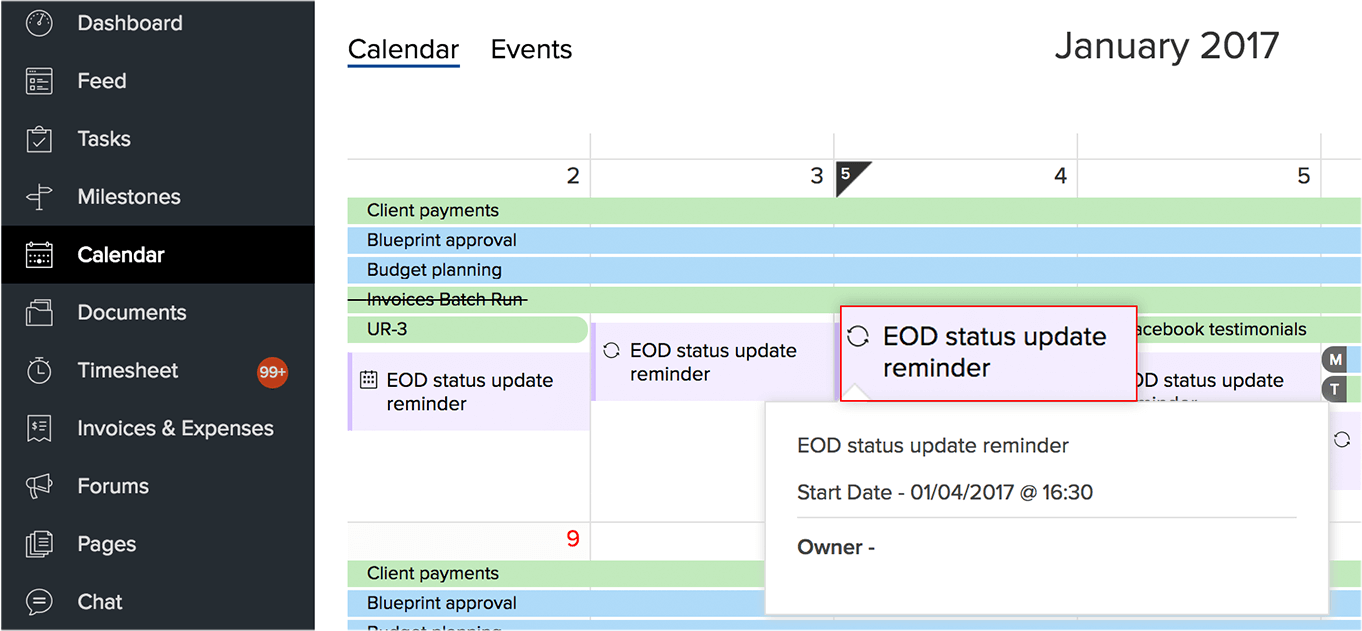
The recurring tasks are displayed virtually based on their recurring frequency. In the Calendar, you can open and edit only the active recurring task; the virtual recurring tasks cannot be edited. Neither can you perform any action on those virtual tasks, they just serve as a reminder for your convenience about the project schedule. The recurring tasks are displayed with the recurring icon -  . You can also view the resource time-offs from your calendar by integrating with Zoho People.
Related Articles
Calendar Booking
Calendar booking comes in handy for the customer to book a meeting almost instantly. It allows customers to see when the support agents are available and enables them to schedule an event or call independently. For example, Travis has just purchased ...Calendar Booking
Calendar booking comes in handy for the customer to book a meeting almost instantly. It allows customers to see when the support agents are available and enables them to schedule an event or call independently. For example, Travis has just purchased ...How can I view a calendar that includes other user's activities?
You can view the activities listed in another user's calendar based on the roles and hierarchy. For example: The CEO can view all the records but the sales manager can view only the records of his subordinates. The sales manager cannot view the CEO's ...Managing Calendar in Zoho Recruit
Planning and scheduling are important for any event. A well-conceived plan goes a long way towards bringing positive results, while properly scheduled events can complement your planning. Calendars are the great for tracking all sorts of events. You ...Using Calendar in Zoho Recruit
Knowing your calendar and the various components in it are helpful in planning all your events and scheduled calls efficiently. This help guide will cover some of the components in the Zoho Recruit calendar to help you make better use of it. Day, ...